Saturday, November 9, 2013

Logging - using ThreadLocal to log messages in one single thread


Logging in your application can be a costly operation. Although frameworks like Log4j provide async logging, it is still costlier. Although the eventual cost of logging depends on to what you are writing your logs to, typically this is a file or a database and this can be a costly operation.

One cool logging strategy is to log everything that happens in one thread at the completion of the thread. Instead of calling your logger multiple times in a thread, just call it once with all the logging information at the end of the thread. The code snippet below can be used to implement such logging.

The code below is written for a web application with a CustomHttpServletRequest. How to write a custom request object is explained in my previous post, link here. CustomHttpServletRequest can safely be replaced with HttpServletRequest in the code below.

Set a cookie enableDebug = true when sending a request to webapp, this will log the debug messages else it will log only error messages. Call ThreadLogger.logStartOfRequest() method to kickoff the enableDebug. In one of my previous posts this gets called from a filter.

This can be slightly modified to work not just for your web applications,  but also for your standalone apps.
(just comment logStartOfRequest() method and find some other way to enableDebug).

import java.io.ByteArrayOutputStream;
import java.io.OutputStreamWriter;
import java.io.PrintWriter;
import java.util.Collections;
import java.util.Enumeration;
import java.util.List;

import javax.servlet.http.Cookie;

public class ThreadLogger {

    private static final String TYPE_MESSAGE = "] ";
    private static final String TYPE_WARNING = "] WARN ";
    private static final String TYPE_ERROR = "] ERROR ";

    private static final class LogBuffer {
        private final ByteArrayOutputStream out;
        private final PrintWriter pw;

        /**
         * Initializes a new instance.
         */
        public LogBuffer() {
            out = new ByteArrayOutputStream();
            pw = new PrintWriter(new OutputStreamWriter(out), true);
        }

        public void appendEntry(String caller, String message, String type,
                Throwable t) {
            pw.print('[');
            pw.print(caller);
            pw.print(type);
            pw.println(message);

            if (t != null) {
                t.printStackTrace(pw);
            }
        }

        /**
         * Returns the content of the buffer, and resets the object for
         * continued use.
         */
        public String toString() {
            final String content = out.toString();
            out.reset();

            return content;
        }
    }

    private static final ThreadLocal<LogBuffer> content = new ThreadLocal<LogBuffer>();
    private static final ThreadLocal<Boolean> enabled = new ThreadLocal<Boolean>();

    private static LogBuffer getLogBuffer() {
        LogBuffer result = content.get();
        if (result == null) {
            result = new LogBuffer();
            content.set(result);
        }
        return result;
    }

    private static void appendCookie(StringBuilder sw, Cookie cookie) {
        if (cookie != null) {
            sw.append("\n  cookie[");
            sw.append(cookie.getName());
            sw.append("] = ");
            sw.append(cookie.getValue());
        }
    }

    private static void appendHeader(StringBuilder sw, String name,
            CustomHttpServletRequestWrapper request) {

        @SuppressWarnings("unchecked")
        final List<String> values = Collections.list(request.getHeaders(name));
        if (values.size() > 0) {
            sw.append("\n  header[").append(name).append("] = ");
            for (int index = 0; index < values.size(); index++) {
                if (index > 0) {
                    sw.append(", ");
                }

                sw.append(values.get(index));

            }
        }
    }

    private static void appendParameter(StringBuilder sw, String name,
            CustomHttpServletRequestWrapper request) {
        String value = request.getParameter(name);
        if (value != null) {
            sw.append("\n  param[");
            sw.append(name);
            sw.append("] = ");

            if (name.contains("username") || name.contains("password")) {
                // truncate username and password for security purposes
                sw.append(value.substring(0, 1) + "........");
            } else {
                sw.append(value);
            }
        }
    }

    private static void appendHeaders(final StringBuilder sb,
            CustomHttpServletRequestWrapper request) {
        Enumeration<String> names = request.getHeaderNames();
        while (names.hasMoreElements()) {
            String name = names.nextElement();
            if (!"Cookie".equalsIgnoreCase(name)) {
                appendHeader(sb, name, request);
            }
        }
    }

    private static void appendParameters(final StringBuilder sb,
            CustomHttpServletRequestWrapper request) {
        Enumeration<String> names = request.getParameterNames();
        while (names.hasMoreElements()) {
            String name = names.nextElement();
            appendParameter(sb, name, request);
        }
    }

    private static void appendCookies(final StringBuilder sb,
            CustomHttpServletRequestWrapper request) {

        Cookie[] cookies = request.getCookies();

        if (cookies != null) {
            for (Cookie cookie : cookies) {
                appendCookie(sb, cookie);

            }
        }

    }

    // this must be called to enableDebug mode if it is set.
    public static void logStartOfRequest(String caller,
            CustomHttpServletRequestWrapper request) {
        final StringBuilder sw = new StringBuilder(256);

        sw.append(" ").append(request.getMethod()).append(" request from ")
                .append(request.getRemoteAddr());
        sw.append("\n  queryString = " + request.getQueryString());

        appendHeaders(sw, request);
        appendParameters(sw, request);
        appendCookies(sw, request);

        getLogBuffer().appendEntry(caller, sw.toString(), TYPE_MESSAGE, null);
        Cookie enableDebug = getCookieValue(request, "enableDebug");

        if (enableDebug != null && "true".equals(enableDebug.getValue())) {
            enabled.set(true);
        }
    }

    public static void flush() {
        if (Boolean.TRUE.equals(enabled.get())) {
            LogBuffer buffer = content.get();
            System.out.print(buffer.toString()); // log it to a log file using
                                                    // Log4j
        }
        content.remove();
        enabled.remove();
    }

    public static void message(String caller, String message) {
        getLogBuffer().appendEntry(caller, message, TYPE_MESSAGE, null);
    }

    public static void warn(String caller, String message) {
        getLogBuffer().appendEntry(caller, message, TYPE_WARNING, null);
    }

    public static void warn(String caller, String message, Throwable t) {
        getLogBuffer().appendEntry(caller, message, TYPE_WARNING, t);
    }

    public static void error(String caller, String message) {
        enabled.set(true);
        getLogBuffer().appendEntry(caller, message, TYPE_ERROR, null);
    }

    public static void error(String caller, String message, Throwable t) {
        enabled.set(true);
        getLogBuffer().appendEntry(caller, message, TYPE_ERROR, t);
    }

    private static Cookie getCookieValue(
            CustomHttpServletRequestWrapper request, String name) {
        Cookie[] cookies = request.getCookies();

        if (cookies != null) {
            for (Cookie cookie : cookies) {
                if (cookie.getName().equals(name)) {
                    return cookie;
                }
            }
        }

        return null;
    }

}

Logging - creating a log record to log all messages once per transaction


In of of my other posts (link here) I explained how to log all events in one thread using a ThreadLocal. However the below simple strategy can be employed when you are sure that your request is executed by one single servlet without any filters and request dispatchers. This class in action can be seen in my other post(link here).

import java.io.PrintWriter; 
import java.io.StringWriter; 
import java.sql.Timestamp; 
import javax.servlet.http.HttpServletRequest;

public class AuditRecord {

        private final StringWriter sw;
        private final PrintWriter pw;

        public AuditRecord(HttpServletRequest request, String caller) {
            sw = new StringWriter();
            pw = new PrintWriter(sw);
            pw.print("[");
            pw.print(caller);
            pw.print("] ");
            pw.print(request.getLocalAddr());
            pw.print(' ');
            pw.println(new Timestamp(System.currentTimeMillis()));
        }

        public void append(String name, String value) {
            pw.print('\t');
            pw.print(name);
            pw.print('=');
            pw.println(value);
        }

        public void append(String message) {
            pw.print('\t');
            pw.println(message);
        }

        public void log() {
            pw.close();
            //log to a logger
            System.out.print(sw.toString());
        }

        public void append(String message, Exception e) {
            append(message);
            pw.println(e.getMessage());
            e.printStackTrace(pw);
        }
    } 

Servlet to handle basic auth login request


One of the simple servlets that you might have seen is a servlet
that accepts basic auth header (WWW-Authenticate) and gives
the user a security session. This is a simple implementation of
one such servlet. It checks if the request already has a basic auth
header. If not it asks client to send one. If basic auth header is
present that is used to authenticate the user and return the user a
single sign on token in the form of a cookie or a String.

This servlet can be tested from browser either by entering credentials
manually in the basic auth credential prompt. It can also be called
from soapui.Soapui can create the basic auth header if user supplied
the username and password.

This uses one of classes named AuditRecord I wrote in my previous posts 
(link here)

import java.io.IOException;
import java.util.regex.Matcher;
import java.util.regex.Pattern;

import javax.servlet.ServletException;
import javax.servlet.http.Cookie;
import javax.servlet.http.HttpServlet;
import javax.servlet.http.HttpServletRequest;
import javax.servlet.http.HttpServletResponse;

import org.apache.commons.codec.binary.Base64;

public class BasicAuthLoginServlet extends HttpServlet {

    private static final long serialVersionUID = -6527953079135467056L;

    private static final String SSO_COOKIE_NAME = "yourcompany-sso";
    private static final String SSO_COOKIE_DOMAIN = ".yourcompany.com";
    private static final String BASIC_AUTH_HEADER_NAME = "WWW-Authenticate";
    private static final String BASIC_AUTH_HEADER_VALUE = "BASIC realm=\"basic_realm\"";

    private static final String SERVLET_NAME = "BasicAuthLoginServlet";

    private final static Pattern basicCredentialPattern = Pattern
            .compile("([^:]+):(.+)");

    protected void doGet(HttpServletRequest request,
            HttpServletResponse response) throws ServletException, IOException {

        final AuditRecord auditRecord = new AuditRecord(request, SERVLET_NAME);
        final String auth = request.getHeader("Authorization");

        try {
            // if user hasn't sent the basic auth info, ask him
            if (auth == null) {
                auditRecord.append("auth header is null");
                response.setStatus(HttpServletResponse.SC_UNAUTHORIZED);
                response.addHeader(BASIC_AUTH_HEADER_NAME,
                        BASIC_AUTH_HEADER_VALUE);
                return;
            }

            // authenticate user
            String ssoToken = loginWithBasic(auth, auditRecord);

            // if ssoToken === null that means authentication failed - send 401
            if (ssoToken == null) {
                response.setStatus(HttpServletResponse.SC_UNAUTHORIZED);
                return;
            }

            // if it has come here that means user has authenticated
            // successfully
            auditRecord.append("authentication successful");

            // if it has come here that means authentication and authorization
            // is successful - send 200
            auditRecord.append("success");
            setSingleSignonCookie(response, "token");
            sendSuccess(response);
        } finally {
            auditRecord.log();
        }

    }

    private void sendSuccess(HttpServletResponse response) throws IOException {
        response.setStatus(HttpServletResponse.SC_OK);
        response.setContentType("text/plain");
        response.getWriter().write("Login successful");
    }

    private void setSingleSignonCookie(HttpServletResponse response,
            String ssoToken) {
        final Cookie cookie = new Cookie(SSO_COOKIE_NAME, ssoToken);
        cookie.setDomain(SSO_COOKIE_DOMAIN);
        cookie.setPath("/");
        cookie.setSecure(true);

        response.addCookie(cookie);
    }

    /**
     * 
     * @param authHeader
     * @param auditRecord
     * @return if authenticated returns a token that represents user's
     *         singlesignontoken
     */
    private String loginWithBasic(String authHeader, AuditRecord auditRecord) {

        String username = null;
        String password = null;

        String result = null;

        if (authHeader != null && authHeader.toUpperCase().startsWith("BASIC ")) {
            String input = new String(Base64.decodeBase64(authHeader.substring(
                    6).getBytes()));
            Matcher m = basicCredentialPattern.matcher(input);
            if (m.find()) {
                username = m.group(1);
                password = m.group(2);
            }
        }

        if (username != null && password != null) {
            auditRecord.append("username", username);
            // call some db or ldap and authenticate using your own logic and
            // give user a single sing on token
            if (username.equals("test") && password.equals("test")) {
                result = "dummySSOToken";
            }
        }

        return result;

    }
}

Handling "Response already committed" IllegalStateException


"Response already committed" is an exception that we quite often 
see when we are using several mvc frameworks. This is typically seen 
when we try to redirect the user to a different resource based on some 
Exception. A simple solution to this would be to cache the response until
we are ready to commit the response. Below solution uses 
ByteArrayOutputStream to cache the response and commit it when the final 
response is ready.
import java.io.ByteArrayOutputStream;
import java.io.IOException;
import java.io.PrintWriter;

import javax.servlet.ServletOutputStream;
import javax.servlet.http.Cookie;
import javax.servlet.http.HttpServletResponse;
import javax.servlet.http.HttpServletResponseWrapper;

public class CustomHttpServletResponseWrapper extends
        HttpServletResponseWrapper {

    private static final String caller = "CustomHttpServletResponseWrapper";
    private BufferedServletOutputStream stream;
    
    private final class BufferedServletOutputStream extends ServletOutputStream {
        private final ByteArrayOutputStream out = new ByteArrayOutputStream();
        private final HttpServletResponse response;

        private BufferedServletOutputStream(HttpServletResponse response) {
            this.response = response;
        }
        
        /**
         * Send the cached response to the device.
         */
        public void commit() throws IOException {
            response.getOutputStream().write(out.toByteArray());
        }

        public void write(int b) throws IOException {
            out.write(b);
        }

        /**
         * Forget the current response; start over again.
         */
        public void reset() {
            out.reset();
        }        
    }


    public CustomHttpServletResponseWrapper(HttpServletResponse response) {
        super(response);
        this.stream = new BufferedServletOutputStream(response);
    }

    @Override
    public void addCookie(Cookie cookie) {

        final StringBuilder buffer = new StringBuilder();

        final String cookieName = cookie.getName();
        final String cookieValue = cookie.getValue();

        super.addCookie(cookie);

        // generate a debug message indicating the addition of cookie
        ThreadLogger.message(caller, " Set cookie[" + cookieName + "] = "
                + cookieValue);
        if (cookie.getSecure()) {
            buffer.append("\n  Secure");
        }
    }

    @Override
    public void sendError(int sc) throws IOException {
        if (sc >= HttpServletResponse.SC_INTERNAL_SERVER_ERROR) {
            ThreadLogger.error(caller, "Sending error response " + sc);
        } else {
            ThreadLogger.warn(caller, " Sending error response " + sc);
        }
        super.sendError(sc);
    }

    @Override
    public void sendError(int sc, String msg) throws IOException {
        if (sc >= HttpServletResponse.SC_INTERNAL_SERVER_ERROR) {
            ThreadLogger.error(caller, "Sending error response " + sc + "\n  "
                    + msg);
        } else {
            ThreadLogger.warn(caller, " Sending error response " + sc + "\n  "
                    + msg);
        }
        super.sendError(sc, msg);
    }

    @Override
    public void sendRedirect(String location) throws IOException {
        ThreadLogger.message(caller, " Sending redirect to " + location);
        super.sendRedirect(location);
    }

    @Override
    public void setHeader(String name, String value) {
        super.setHeader(name, value);

    }

    public void completed() {
        ThreadLogger.message(caller, "Response completed.");
        ThreadLogger.flush();
    }
    
    @Override
    public ServletOutputStream getOutputStream() throws IOException {
        return stream;
    }

    @Override
    public PrintWriter getWriter() throws IOException {
        return new PrintWriter(stream);
    }

    @Override
    public void reset() {
        stream.reset();
        ThreadLogger.message(caller, "Cleared previous response.");

        super.reset();
    }

    @Override
    public void flushBuffer() throws IOException {
  stream.flush();
    }
}
 

Wrapping an HttpServletRequest and HttpServletResponse


Sometimes we want to wrap our request and response objects and provide 
new functionality as seen in the classes below. Below is an example of 
how to wrap these objects. There needs to be a filter that intercepts 
the request and response and supply the wrapped objects. The filter needs
to be mapped in web.xml which is not shown. The code below uses another 
class I explained in another post (link here). 
import java.util.Collections;
import java.util.Enumeration;
import java.util.HashMap;
import java.util.Map;

import javax.servlet.http.HttpServletRequest;
import javax.servlet.http.HttpServletRequestWrapper;

public class CustomHttpServletRequestWrapper extends 
                                    HttpServletRequestWrapper {

 private final Map parameterMap;
 private static final String caller = 
                             "CustomHttpServletRequestWrapper";
 private String method;
 
 public CustomHttpServletRequestWrapper(HttpServletRequest request) {
 super(request);

 this.parameterMap = copyParameters(request);
 this.method = request.getMethod();
 }

 @SuppressWarnings("unchecked")
 private Map copyParameters(HttpServletRequest request) {
 final Map result = new HashMap();
 result.putAll(request.getParameterMap());

 return result;
 }

 @Override
 public String getMethod() {
 return method;
 }

 @Override
 public String getParameter(String name) {
 String[] values = getParameterValues(name);
 return (values != null && values.length > 0) ? values[0] : null;
 }

 @Override
 public Map getParameterMap() {
 return parameterMap;
 }

 @Override
 public Enumeration getParameterNames() {
 return Collections.enumeration(parameterMap.keySet());
 }

 @Override
 public String[] getParameterValues(String name) {
 return parameterMap.get(name);
 }

 public void setMethod(String method, String reason) {
 if (this.method != method) {
  final StringBuilder sb = new StringBuilder();

 sb.append(" Method changed to ").append(method);
 sb.append("\n  ").append(reason);

 ThreadLogger.message(caller, sb.toString());

 this.method = method;
 }
 }

 public void renameParameter(String oldName, String newName) {
 String[] values = parameterMap.get(oldName);
 if (values != null) {
  parameterMap.remove(oldName);
  parameterMap.put(newName, values);
 }
 }

 public void removeParameter(String name) {
 parameterMap.remove(name);
 }
}

import java.io.IOException;

import javax.servlet.http.Cookie;
import javax.servlet.http.HttpServletResponse;
import javax.servlet.http.HttpServletResponseWrapper;

public class CustomHttpServletResponseWrapper extends
  HttpServletResponseWrapper {

 private static final String caller = "CustomHttpServletResponseWrapper";

 public CustomHttpServletResponseWrapper(HttpServletResponse response) {
 super(response);
 }

 @Override
 public void addCookie(Cookie cookie) {

 final StringBuilder buffer = new StringBuilder();

 final String cookieName = cookie.getName();
 final String cookieValue = cookie.getValue();

 super.addCookie(cookie);

 // generate a debug message indicating the addition of cookie
 ThreadLogger.message(caller, " Set cookie[" + cookieName + "] = "
   + cookieValue);
 if (cookie.getSecure()) {
  buffer.append("\n  Secure");
 }
 }

 @Override
 public void sendError(int sc) throws IOException {
 if (sc >= HttpServletResponse.SC_INTERNAL_SERVER_ERROR) {
  ThreadLogger.error(caller, "Sending error response " + sc);
 } else {
  ThreadLogger.warn(caller, " Sending error response " + sc);
 }
 super.sendError(sc);
 }

 @Override
 public void sendError(int sc, String msg) throws IOException {
 if (sc >= HttpServletResponse.SC_INTERNAL_SERVER_ERROR) {
  ThreadLogger.error(caller, "Sending error response " + sc + "\n  "
    + msg);
 } else {
  ThreadLogger.warn(caller, " Sending error response " + sc + "\n  "
    + msg);
 }
 super.sendError(sc, msg);
 }

 @Override
 public void sendRedirect(String location) throws IOException {
 ThreadLogger.message(caller, " Sending redirect to " + location);
 super.sendRedirect(location);
 }

 @Override
 public void setHeader(String name, String value) {
 super.setHeader(name, value);
 }

 public void completed() {
 ThreadLogger.message(caller, "Response completed.");
 ThreadLogger.flush();
 }
 }

import java.io.IOException;

import javax.servlet.FilterChain;
import javax.servlet.FilterConfig;
import javax.servlet.ServletException;
import javax.servlet.ServletRequest;
import javax.servlet.ServletResponse;
import javax.servlet.http.HttpServletRequest;
import javax.servlet.http.HttpServletResponse;

public class CustomFilter implements javax.servlet.Filter {

 private String dummyInitParam;

 private static final String LOGGER_PREFIX = "[CustomFilter] ";
 private static final String caller = "CustomFilter";

 @Override
 public void init(FilterConfig filterConfig) throws ServletException {

 this.dummyInitParam = filterConfig
   .getInitParameter("existingPlusLoginUrl");

 }

 @Override
 public void destroy() {
 ThreadLogger.message(caller, LOGGER_PREFIX + "destroyed");
 }

 @Override
 public void doFilter(ServletRequest request, ServletResponse response,
  FilterChain chain) throws IOException, ServletException {

 final CustomHttpServletRequestWrapper requestWrapper = new CustomHttpServletRequestWrapper(
   (HttpServletRequest) request);
 final CustomHttpServletResponseWrapper responseWrapper = new CustomHttpServletResponseWrapper(
   (HttpServletResponse) response);

 try {
  doHttpFilter(requestWrapper, responseWrapper, chain);
 }

 finally {
  responseWrapper.completed(); // need to call this to flush
          // ThreadLogger
 }
 }

 public void doHttpFilter(CustomHttpServletRequestWrapper request,
  CustomHttpServletResponseWrapper response, FilterChain chain)
  throws IOException, ServletException {
 ThreadLogger.message(caller, "dummyParam: " + dummyInitParam);

 // log important stuff
 logStartOfRequest(request);

 // do other stuff you want to do here.

 // turn off caching
 setNoCacheHeaders(response);

 executeChain(request, response, chain);
 }

 private void executeChain(CustomHttpServletRequestWrapper request,
  HttpServletResponse response, FilterChain chain)
  throws IOException, ServletException {
 ThreadLogger.message(caller, "Executing filter chain");

 chain.doFilter(request, response);

 }

 private void setNoCacheHeaders(HttpServletResponse response) {
 response.setHeader("Expires", "Tue, 31 Dec 2010 00:00:00 UTC");
 response.setDateHeader("Last-Modified", System.currentTimeMillis());
 response.setHeader("Cache-Control",
   "no-store, no-cache, must-revalidate, max-age=0");
 response.setHeader("Pragma", "no-cache");
 }

 private void logStartOfRequest(CustomHttpServletRequestWrapper request) {
 // This must be called to enableDebug mode if it is set. Set a cookie
 // enableDebug = true to enable debug.
 // This will log all your request's state
 ThreadLogger.logStartOfRequest(caller, request);
 }
}

Coding - A generic String to Date parse utility


A generic Date utility that accepts date in ymd or dmy format. 
import java.text.DateFormat;
import java.text.ParseException;
import java.text.SimpleDateFormat;
import java.util.Date;
import java.util.regex.Matcher;
import java.util.regex.Pattern;

public class DateUtils {
 private static final Pattern ymd = Pattern
 .compile("^(\\d{4})-([1-9]|[0][1-9]|1[0-2])
              -([1-9]|0[1-9]|[12][0-9]|[3][01])$");
 private static final Pattern dmy = Pattern
 .compile("^([1-9]|[0][1-9]|1[0-2])
              -([1-9]|0[1-9]|[12][0-9]|[3][01])-(\\d{4})$");
 private static final DateFormat df = new SimpleDateFormat(
                                                  "yyyy-MM-dd");
 
 static {
 //prevents using "2001-02-29" for March 1st
 df.setLenient(false);
 }
 
 private static Date parse(String value) {
  if (value == null) {
 return null;
  }
 
 String input = value.trim().replaceAll("[\\./ ]", "-");
 if (input.length() < 8) {
  return null;
 }
 
 String ds = null;
 Matcher matcher = ymd.matcher(input);
 
 if (matcher.find()) {
  ds = matcher.group(1) + "-" + matcher.group(2) + "-"
   + matcher.group(3);
 } else {
  matcher = dmy.matcher(input);
  if (matcher.find()) {
   ds = matcher.group(3) + "-" + matcher.group(1) + "-"
    + matcher.group(2);
  }
 }

 Date result = null;
 if (ds == null) {
 // user's inputer does not match an expected format
 } else {
 try {
  result = df.parse(ds);
} catch (ParseException e1) {
 // should not happen, but treat it the same as invalid input
 // there is no need to log
 }
}

 return result;
}

public static void main(String[] args) {
 String[] inputs = { "2016-9-8", "2016-09-8", "2016-09-08", "2016-9-08",
  "9-8-2016", "09-8-2016", "09-08-2016", "9-08-2016", "9/8/2016",
  " 9-8-2016", " 2016-9-8", "9-8-2016 ", "2016-9-8 ",
  "2016 9 8 ",
  null, "13-1-9999", "1-33-9999", "9999-13-1", "9999-1-33" };

 for (String input : inputs) {
 System.err.println(input + "\t" + parse(input));
 }
}

}


Coding patterns - coding a method that always throws an exception


Sometimes we have a method that does some business logic and it 
always throws a known exception. One example can be if a user tried
to login unsuccessfully, we want to log that information and 
always throw a custom exception which the clients catch and handle
accordingly. In such case there is a simple coding pattern that 
makes the code look cleaner. 
This is an example without the coding pattern applied. See below with 
the pattern.

public void  handleLoginFailure(String CustomExceptionMessage) 
                                         throws CustomException{
 //do some logic before throwing the CustomException
 throw new CustomException(CustomExceptionMessage);
}

public void testMethod() throws CustomException{
 handleLoginFailure("username and password invalid"); 
}

This is an example with the coding pattern applied. Now someone 
reading testMethod() knows that handleLoginFailure() always throws 
an exception thus simplyfing the code readability.
public CustomException handleLoginFailure
                         (String CustomExceptionMessage) {
 //do some logic before throwing the CustomException
 return new CustomException(CustomExceptionMessage);
}

public void testMethod() throws CustomException{
 throw handleLoginFailure("username and password invalid"); 
}

Openam custom modules - use of redirect callback


<ModuleProperties moduleName="SampleAuth" version="1.0" >
    <Callbacks length="1" order="1" timeout="600" header="Redirecting" >
        <RedirectCallback method="get">
            <RedirectUrl>#Dummy url#</RedirectUrl>
            <RedirectStatusParam>#Dummy url#</RedirectStatusParam>
        </RedirectCallback>        
        <NameCallback isRequired="true">
            <Prompt>return parameter from redirected url</Prompt>
        </NameCallback>
    </Callbacks>
</ModuleProperties>


in your process method you will have this code returning 1 (which is order of  the callbacks tag which has RedirectCallback)


Map<String, String> redirectData = new HashMap<String, String>();
redirectData.put("param1", "123");
redirectData.put("param2", "abc");


RedirectCallback rc = new RedirectCallback(redirectUrl, redirectData, "POST");
super.replaceCallback(1, 0, rc); // 1 is order of callbacks tag. 0 is the first callback which is                //RedirectCallback


Openam custom modules - stop chaing processing and take the user to error page


protected LoginException handleLoginFailure(String url, String exceptionMessage) {
        try {
            if(url != null){
                super.setLoginFailureURL(url);
            }
        } catch (AuthLoginException e) {
            ThreadLogger.error(moduleName, "Failed to set the loginFailureUrl", e);
        }

        ThreadLogger.message(moduleName, "handleLoginFailure about to throw Exception");

        return new LoginException(exceptionMessage);
    }

Openam custom modules - Role of LOGIN_IGNORE


Sunday, May 13, 2012

Selection Sort in Java


public class SelectionSort {
    public static void main(String[] args) {
       int[] array = {6,7,3,8,1,2,3,4,5};
       new SelectionSort().selectionSort(array);

       for(int i=0; i < array.length  ; i++)
           System.out.println(array[i]);        
    }

    public void selectionSort(int[] array ){
       int min = 0;
       int length = array.length;

       for (int i = 0; i <= length - 2; i++){
           min = i;
           for(int j = i+1 ; j <= length - 1 ; j++){
                 if(array[min] > array[j]){
                    min = j;
                 }
       }

            if(min != i){     // This if condition is not there in original algorithm. It helps unnecessary swapping of same value in to same location again (min = i) 
                int temp = array[i];
                array[i] = array[min];
                array[min] = temp;
            }
        }
      }
}

Bubble Sort in Java


public class BubbleSort {
    public static void main(String[] args){
       int[] array = {1,2,3,4,5};
       new BubbleSort().bubbleSort(array);

       for(int i=0; i < array.length  ; i++)
           System.out.println(array[i]);        
    }

    public void bubbleSort(int[] array){
       int length = array.length;
       int count = 0; //counts if no swapping is done

       for(int i = 0 ; i <= length-2 ; i++){
           count = 0;
           for(int j = 0 ; j <= length-i-2 ; j++){
                 if(array[j] > array[j+1]){
                     int temp = array[j];
                     array[j] = array[j+1];
                     array[j+1] = temp;
                     count ++ ;
                   }                      
               }
            if(count == 0){  // This if is not there in actual algorithm. If there are no swaps in the pass that means the array is sorted
                  System.out.println("broke on i = " + i);
                  break;                 
            }
         }
    }  
}

Insertion Sort in Java


public class InsertionSort {
    public static void main(String[] args){
       int[] array = {6,7,3,8,1,2,3,4,5};
       new InsertionSort().insertionSort(array);

       for(int i=0; i < array.length  ; i++)
           System.out.println(array[i]);        
    }

    public void insertionSort(int[] array){
       for(int j=1; j <= array.length-1; j++){
     insert(array, j);
       }      
    }
    
    //insert array[index] into sorted sequence array[0]...array[index-1]
    private void insert(int[] array, int indexToInsert){
     int key = array[indexToInsert];
     int i = indexToInsert - 1;
     
     while(i >=0 && array[i] > key){
           array[i+1] = array[i];
                        i--;
     }
     array[i + 1] = key;
    }
}

Saturday, May 12, 2012

Doubly linked list implementation in java

I used generics here to write this.

public class DLLNode {
   private E data = null;
   private DLLNode prevNode = null;
   private DLLNode nextNode = null;

   public E getData() {
     return data;
   }

   public void setData(E data) {
     this.data = data;
   }

   public DLLNode getPrevNode() {
     return prevNode;
   }

   public void setPrevNode(DLLNode prevNode) {
     this.prevNode = prevNode;
   }

   public DLLNode getNextNode() {
     return nextNode;
   }

   public void setNextNode(DLLNode nextNode) {
     this.nextNode = nextNode;
   }
}


public class DoublyLinkedList {
  private DLLNode headNode = null;
  private DLLNode tailNode = null;
  private int nodeCount = 0;

  public void addFirst(E data){
    DLLNode newNode = new DLLNode();
    newNode.setData(data);

    if(headNode == null && tailNode == null){
       headNode = tailNode = newNode;  //new node becomes both head and tail
    }
 
    else{            
       newNode.setNextNode(headNode);
       headNode.setPrevNode(newNode);
       headNode = newNode;
    }

    nodeCount++;     
 }

 public void addLast(E data){
    DLLNode newNode = new DLLNode();
    newNode.setData(data);

    if(headNode == null && tailNode == null){
       headNode = tailNode = newNode;  //new node becomes both head and tail
    }

    else{            
       tailNode.setNextNode(newNode);
       newNode.setPrevNode(tailNode);
       tailNode = newNode;
    }

    nodeCount++;     
  }

  public boolean delete(E data){
     DLLNode curNode = headNode;
     DLLNode prevNode = headNode;

     while(curNode != null){
        if(curNode.getData().equals(data)){   //find the node which has the data
              prevNode = curNode.getPrevNode();

              if(nodeCount == 1){ // if there is only node in the list, and that one node contains the data to be deleted
                  headNode = tailNode = null; // now both head and tail points nowhere                             
               }   
  
              else if(curNode == headNode){
                  headNode = headNode.getNextNode(); // move the head node to next node
                  headNode.setPrevNode(null); // make new head node's  prev node value as null
                  curNode.setNextNode(null); // set the next node of the previous head node (cur node) to null                                      
               }

         else if(curNode == tailNode){
                  tailNode = prevNode;       // make the tail node as previous node
                  tailNode.setNextNode(null); //set the next node of tail node as null, as this is the tail node
                  curNode.setPrevNode(null);  //make cur node not point to prev node                       
                }

               else{
                  prevNode.setNextNode(curNode.getNextNode());  // make the prev node point to next node of cur node
                  curNode.getNextNode().setPrevNode(prevNode);  //make next node point to pren node
                  curNode.setNextNode(null); // make cur node not point to next node
                  curNode.setPrevNode(null); // make cur node not point to prev node                       
                }

                nodeCount--;
                return true;  //return true to say that data is found and is deleted 
             }           
             curNode = curNode.getNextNode();
      }
      return false;  // //return false to say that data is not found and is not deleted
  }


  public void displayLinkedListFromHead(){
      DLLNode node = headNode;
      System.out.println("Node Count: " + nodeCount);
      if(headNode != null){
          System.out.println("Head Node: " + headNode.getData());
          System.out.println("Tail Node: " + tailNode.getData());
      }

      while(node != null){
          System.out.println(node.getData().toString());
          node = node.getNextNode();
      }
 }    

  public void displayLinkedListFromTail(){
      DLLNode node = tailNode;
      System.out.println("Node Count: " + nodeCount);
      if(headNode != null){
           System.out.println("Head Node: " + headNode.getData());
           System.out.println("Tail Node: " + tailNode.getData());
      }

      while(node != null){
           System.out.println(node.getData().toString());
           node = node.getPrevNode();
      }

    }    
}

public class TestDLL {
    public static void main(String[] args){
       DoublyLinkedList list = new DoublyLinkedList();
       list.addFirst(1);
       list.addFirst(2);
       list.addLast(3);
       list.addLast(4);

       //list.delete(2);
       //list.delete(3);
       //list.delete(2);
       list.delete(4);
  
       list.displayLinkedListFromHead();
       list.displayLinkedListFromTail();
      }
}

Singly linked list implementation in java

I used generics here to write this.

public class Node {
   private E data = null;
   private Node nextNode = null;

   public Node(E data){   
     this.data = data;
     this.nextNode = null;
   }

   public Node(){   
   }

   public E getData() {
       return data;
   }

   public void setData(E data) {
      this.data = data;
   }

   public Node getNextNode() {
       return nextNode;
   }

   public void setNextNode(Node nextNode) {
        this.nextNode = nextNode;
   }
}


public class SinglyLinkedList {
     private Node headNode = null;
     private Node tailNode = null;
     private int nodeCount = 0;    

     public void addFirst(E data){  // add to the head
       Node newNode = new Node(data);      

       if(headNode == null && tailNode == null){ // if list is empty, newNode is both the head and tail
           headNode = tailNode = newNode;                        
       }

       else{  // make newly added node as head node
           newNode.setNextNode(headNode);
           headNode = newNode;                             
       }

       nodeCount++;  
     }


     public void addLast(E data){ // add to the tail
       Node newNode = new Node(data);

       if(headNode == null && tailNode == null){ // if list is empty, newNode is both the head and tail
          headNode = tailNode = newNode;                        
       }

       else{ // make newly added node as tail node
          tailNode.setNextNode(newNode);
          tailNode = newNode;                 
       }
       nodeCount++;
     }    

     public boolean delete(E data){
       Node curNode = headNode;
       Node prevNode = headNode;

       while(curNode != null){
             if(curNode.getData().equals(data)){   //find the node which has the data
                  if(nodeCount == 1){ // if there is only node in the list, and that one node contains the data to be deleted
                     headNode = tailNode = null; // now both head and tail points nowhere                             
                   }   
                  else if(curNode == headNode){
                     headNode = headNode.getNextNode(); // move the head node to next node             
                     curNode.setNextNode(null); // set the next node of the previous head node (cur node) to null null                                      
                   }   

                  else if(curNode == tailNode){
                    tailNode = prevNode;       // make the tail node as previous node
                    tailNode.setNextNode(null); //set the next node of tail node as null, as this is the tail node
                  }
                  
                  else{
                    prevNode.setNextNode(curNode.getNextNode());  // make the prev node point to next node of cur node
                    curNode.setNextNode(null); // make cur node not point to next node                             
                  }
 
                  nodeCount--;
                  return true;  //return true to say that data is found and is deleted 
             }

             prevNode = curNode;
             curNode = curNode.getNextNode();
       }
       return false;  // //return false to say that data is not found and is not deleted
     }

    
     public void displayLinkedList(){
       Node node = headNode;
       System.out.println("Node Count: " + nodeCount);     

       if(headNode != null){
             System.out.println("Head Node: " + headNode.getData());
             System.out.println("Tail Node: " + tailNode.getData());
       }

       while(node != null){
             System.out.println(node.getData().toString());
             node = node.getNextNode();
       }
     }   
}


public class TestLinkedList {
   public static void main(String [] args){
      SinglyLinkedList list = new SinglyLinkedList();
      
      list.addFirst(1);
      list.addFirst(2);
      list.addLast(3);
      list.addLast(4);
      list.addFirst(5);
  
      list.displayLinkedList();

      list.delete(5);
      list.delete(4);  

      list.displayLinkedList();

   }
}

Sunday, January 22, 2012

Writing an EJB 2.0 stateless session bean in RSA

1.    Go to Window> Preferences> General> Capabilities, and in the dialog, choose Enable All, and Apply.
2.    Go to Window> Preferences> Java >Compiler.  Ensure that the JDK Compliance is 5.0.
3.    Go to Window> Preferences> Java> Installed JREs and make sure Websphere v6.1 JRE is selected.
4.    Go to  Project,  and check "Build Automatically".

Create Enterprise Application Project(EAR) and Enterprise Java Bean Project (EJB)

1. Switch  to the J2EE  perspective  and  create a new Enterprise Application  Project using File >New>Other.
2. In the  New dialog box, find  the J2EE section, then select  Enterprise Application  Project,  click Next.


3.    Name your project "HeadFirstEJB-ear". Click the Finish button. Note: You may see an error on the EAR project, this is OK;  this is because there is no EJB project in the EAR yet.
4.    Now create the  EJB project.  File>  New>  Other.
5.    Find the  EJB section,  select EJB  Project,  and  click Next.
6.    Name the project "HeadFirstEJB-ejb", make sure the "Add project to an EAR" checkbox is selected and the EAR Project is HeadFirstEJB-ear. Press Next.


7.    Skip the  Project Facets screen  by clicking the  Next  button.

8.    On the EJB module screen, make sure to uncheck the "Create an EJB Client Jar module to hold the client interfaces and classes" checkbox, then click Finish.

Note: You  may see  an  error on the  EJB  project; this  is ok,  as  there  are  no  beans  in the  project yet.

Go to the  Project Explorer window and expand  both the  EAR and  EJB projects.

Create Session Bean:

In RSA, select the Project Explorer and expand the EJB project, then expand the Deployment Descriptor section. It should look similar to this:
we are creating a Session bean called "Advice".

1.   Right-click on the Session  Beans entry, and  select New> Session  Bean
2.   In the Create an Enterprise Bean dialog, name the bean Advice, and ensure that     the package name is ejbs. Note: Do NOT NAME IT "ADVICE BEAN'', then press Next.
 
     3. On the next screen, you shouldn't have to change anything, but should note that the wizard is going to create the three files (one class and two interfaces)
 

4. Press Next twice  (skipping the  EJB Java Class Details screen). On the Select Class Diagram for Visualization screen, uncheck the "Add bean to Class Diagram" checkbox and then press Finish. There will now be no errors on the projects.

5. Now if you  expand the Advice  bean  section in the  project explorer, you should be able to see the three files that  have been  created for you  by the wizard.   See the  following:


Bean Class:
If you double-click the AdviceBean class in the project ,explorer, it will open up the bean class.
Note that the wizard has already created the boilerplate code for the Session Bean interface as well as the creation method: ejbCreate(), ejbActivate(), ejbPassivate(), ejbRemove() and
setSessionContext( SessionContext ). The wizard also created a seriaiVersionUID that is recommended for any class that is serializable. The Session Bean interface extends Serializable. There is also a mySessionCtx variable to hold the session context that is set by the server. The server will call setSessionContext() during the beans lifecycle.

Type in the getAdvice() method in thw AdviceBean.java file. Take a look at the Advice.java interface file. You will need to add the getAdvice() method signature to it. There's another way to have RSA add your method signatures to the interfaces, but for now, do it by hand.

In the  AdviceHome.java  interface, the wizard  has taken  care of the create()  method for you.

Viewing the  Deployment Descriptor:Select and expand the EJB project. In the J2EE Perspective, you can open the Deployment Descriptor by double-clicking on the entry (Deployment Descriptor) just below the HeadFirstEJB-ejb. Or you can open the ejbModule folder, expand the META-INF folder, and then double-click on the ejb-jar.xml file. This will open the Deployment Descriptor editor.


At this point you can view the Deployment Descriptor to see what RSA has created. It is worth noting that when using the J2EE perspective, RSA displays in slightly different fashion than when in the Java perspective. After opening the project, switch back and forth, and observe the differences.

There are tabs along the bottom of the editor which  present a user friendly view of the  Descriptor.   (Do

not be concerned with  understanding everything that is being presented.)    By default, the source tab is

not open for view.   Find the Source tab, and  click on it.  You should  see the following.


Deploying the  Application:
At this point, you have an application that can actually be deployed to the server. Before you can deploy the application however, you need to generate the deployment code. This process generates the code needed to facilitate the remote EJB call from the client.

1. In the Package Explorer, select the EJB project, right-click on it. In the selection list about 3/4 down choose Prepare For Deployment. Note: There will be no successful completion message; if you do not see an error, the process was successful. Examine the new contents of the ejbModule folder to see the new artifacts & packages that RSA created. The generated code will be distinctive and will have names prefaced with an underscore and/or EJS. See the following:


2.    If there is no server view pane open, open it now (Window> Show View> Servers). When creating a new workspace, RSA should have created a server(s) by default. If there are no servers present in the view, right-click in the server pane and create a new server- you can use the default RSA profile. Now start the server and ensure that it starts correctly by viewing the console output- you should see no errors.

3.     You are now ready to deploy the application. In the server pane, select the server. Right-click and choose Add and Remove Projects from the list. This will bring up the following dialog:


4.The  EAR project will appear in the Available  Projects section.   Click the Add  button to move the project to the Configured  projects, and  click Finish.

5. You will see  activity in the console. Check the console for successful installation. Among other information, you should see a line of text containing the following: Application    started:
HeadFirstEJB-ear.  Right-click on the server and select Stop. 

 RSA-  Universal Test Client
We will now examine a built in facility in RSA to test EJBs.
Excerpt from  IBM  Help  Center:

Universal  Test Client:
The server tools provide you with a Web-based Universal Test Client where you can test your enterprise beans and other Java objects running in a local or remote server. Using this test client, you can test the local or remote interface methods of your enterprise beans. By calling the methods and passing user-defined arguments you can test the methods to ensure that they work correctly.

Using  the  Universal  Test  Client,  you  can  accomplish  the  following  tasks:

• Find  an  enterprise  bean  when  you  know  or do  not  know  the  JNDI  name
• Call  a  method
• Remove  an  enterprise  bean
• View  public  fields  of methods
• View  fields
• View  methods
• Filter the  methods  displayed  in  the  Universal  Test  Client

Following, are some basic steps to  use the  Universal Test Client:

1. If your server is not still  running from the  previous exercise,  please  start it now.
2. Right-click on the 6.1  server in the server view,  and  select Run  Universal Test  Client  (third
option from the  bottom of list).  The test client  page should  appear.
3. In the  upper left of the pane,  click on JNDI  Explorer.   This will display information in the  right pane.


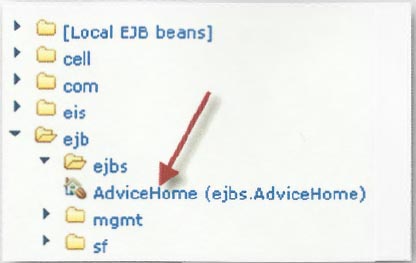
4. Now in the  right-hand  pane and  expand the ejb folder. Expand the ejbs folder and  click on the AdviceHome  entry.


5. Now look in the  upper left corner of the  pane.  Expand the AdviceHome  entry and  click Advice Create()


6.    In the  right-hand  pane click on the  Invoke  button. This calls the create()  on  Home interface.


7.   Now another button appears just below the  Invoke button.  Click the Work  with  Object  button.


8. You will  see another entry appear in  upper left called  Advice  1.   Click on this entry to expand it.
9. The methods available in the Advice bean- getAdvice() is displayed.
10. Click on the getAdvice()  method.  An  Invoke button will  now appear in the  right-hand  pane.


11.    Click the  Invoke  button in the  right  pane and the output from getAdvice() will  be displayed!